My Region

Picture this: a support ticket lands at 11 pm, a project update buries an urgent risk in three paragraphs, and nobody notices until Monday morning. Most teams lose hours every week to exactly this kind of manual triage. It's not a resourcing problem. It's a workflow problem.
This is where monday.com work management is changing the game. With monday AI Blocks, teams can now summarise updates, sort requests, translate messages, and trigger next steps automatically, all without writing a single line of code. For business owners juggling lean teams and growing workloads, this shift matters more than most software updates ever have.
In this guide, we'll unpack what AI Blocks actually do, how they slot into your existing boards, and where a bit of expert guidance can turn a handy feature into a genuine competitive edge.
What Are monday AI Blocks, Exactly?
AI Blocks are pre-built, drag-and-drop components inside the monday.com Workflow Builder. Each block performs a specific AI task, and you can chain several together to form a complete automated process.
Unlike traditional automation, which only follows fixed if-this-then-that rules, AI Blocks bring judgement into the mix. They can read context, interpret tone, and make decisions based on the content itself, not just a status change.
In practical terms, that means a block can:
- Read an incoming request and work out which department should handle it.
- Summarise a lengthy update into three clear bullet points.
- Detect urgency from the wording of a message.
- Pull key details out of an uploaded PDF or contract.
- Draft a first-pass reply, ready for a human to review.
None of this requires a developer. It's built for the person already running the board.
Why This Matters for monday.com Work Management
Work management has always been about getting the right task to the right person at the right time. AI Blocks simply remove the manual steps that used to sit in between.
Consider a mid-sized professional services firm handling client intake. Previously, a coordinator manually read every enquiry, categorised it, and assigned it to a consultant. With AI Blocks running inside the workflow, that entire triage step happens in seconds, and the coordinator's time goes towards higher-value client conversations instead.
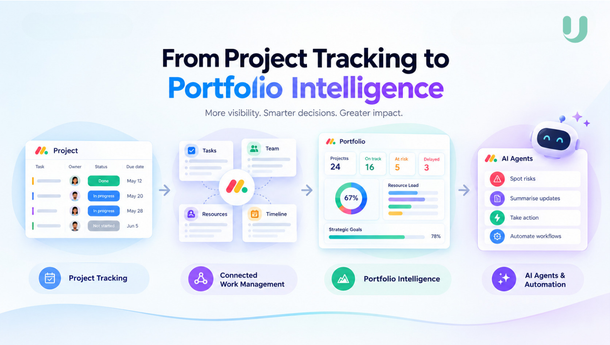
That's the real shift. monday.com work management stops being about tracking tasks and starts being about actively moving work forward, with AI handling the repetitive judgement calls.
Where AI Blocks Fit Inside monday.com
AI Blocks aren't a separate product. They live across three areas of the platform, and understanding the difference helps you pick the right starting point.
If you're new to this, start with a single AI column on one board. Once you're comfortable, move up to the full workflow builder for anything that spans multiple teams or boards.
How to Build an AI Workflow Without Coding
- Open the Workflow Builder from inside your monday.com account.
- Choose a trigger, such as a new item being created or a status change.
- Add an AI Block, for example, a summarise, categorise, or extract action.
- Reference variables like column values, item names, or board IDs so the block knows what data to work with.
- Set the tone and length for any generated text, keeping it consistent with your brand voice.
- Add a follow-up action, such as assigning an owner or notifying a team member.
- Test the workflow on a handful of real items before rolling it out fully.
Small adjustments to your instructions inside each block often make a big difference to output quality. Being specific with wording and using at least one variable tends to produce far more reliable results.
Real-World Use Cases Worth Trying
AI Blocks aren't limited to one department. Here's where they tend to deliver the fastest wins:
Customer support teams use them to triage incoming tickets, detect urgent language, and route requests without a human touching every single one.
Sales teams rely on AI Blocks to summarise call notes, extract deal details from documents, and flag deals that need urgent attention.
Operations teams use them to pull key data from invoices or supplier emails, cutting down manual data entry significantly.
Marketing teams use them to draft first versions of social captions or newsletter copy based on campaign data already sitting in a board.
In each case, the pattern is the same: repetitive reading and sorting work gets automated, freeing people up for decisions that actually need a human.
monday AI Agents vs AI Blocks: What's the Difference?
This is where confusion often creeps in. AI Blocks and monday AI agents solve different problems, and it helps to know which one you actually need.
- AI Blocks work inside an existing workflow. They complete one task, then hand control back to the process.
- monday AI agents operate more independently. They can handle multi-step tasks on their own, such as responding to emails or running an entire process end-to-end, without a person triggering each step.
Most teams start with AI Blocks because they're faster to set up and easier to trust while you're still learning how AI fits into your operations. Agents tend to make sense once your workflows are mature and you're ready to hand over more autonomy.
Common Mistakes to Avoid
Even a no-code tool can go wrong if it's set up carelessly. Watch out for these:
- Vague instructions. An AI Block with unclear wording produces unpredictable output. Be specific about what you want and reference real data.
- Skipping the test phase. Always trial a workflow on a small batch of items before applying it board-wide.
- Ignoring credit usage. AI actions consume credits, so it pays to monitor usage on high-volume boards.
- Overcomplicating early workflows. Start with one or two blocks, then expand once the basics are working reliably.
When to Bring in monday.com Experts
Setting up a single AI Block is simple enough for most teams to handle alone. But designing workflows that span multiple boards, departments, and data sources is a different challenge altogether.
This is typically where monday.com experts add real value, not by doing something you could eventually figure out yourself, but by shortcutting the trial-and-error. An experienced partner will map your actual process first, then build the workflow around it, rather than forcing your process to fit a generic template.
If you've hit a wall trying to connect boards, troubleshoot a workflow that isn't triggering correctly, or simply want a second opinion before rolling something out company-wide, reaching out for monday.com support or a specialist partner can save weeks of guesswork.
At upstream, we spend a lot of our time doing exactly this: turning a business's day-to-day process into a working monday.com setup that actually holds up under real use, AI Blocks included.
Frequently Asked Questions
Do I need any coding skills to use monday AI Blocks?
No. AI Blocks are drag-and-drop components built for non-technical users, requiring no coding knowledge at all.
What's the difference between AI Blocks and monday AI agents?
AI Blocks handle single tasks inside a workflow, while monday AI agents can manage multi-step processes independently, with less human input required.
Which monday.com plan includes AI Blocks?
AI Blocks are generally available across most paid plans, though usage is tied to an AI credit system, so it's worth checking your current plan's allowance.
Can AI Blocks work with data from PDFs or uploaded files?
Yes. Several blocks can extract key details directly from uploaded documents, saving manual data entry.
Is it worth hiring monday.com experts to set up AI workflows?
For simple, single-board tasks, most teams manage fine on their own. For workflows spanning multiple boards or departments, expert support tends to save significant time and avoid early mistakes.
Final Thoughts
AI Blocks represent a genuine shift in how monday.com work management operates. They take the repetitive, judgement-based tasks that used to eat up a team's day, and hand them to AI, all without a developer in sight.
Start small, test often, and expand as your confidence grows. And if a workflow starts feeling bigger than a quick DIY fix, that's usually the sign it's time to bring in a second set of hands.
Ready to put AI Blocks to work in your business? Get in touch with our team for a free consultation, and we'll help you map out an AI-powered workflow built around how your business actually runs.