My Region
A Practical Guide for Modern Teams on Properly Utilising Workflow Automation on

To some, it is obvious how important workflow automation is to businesses. It shrinks the time, effort, and people needed to complete manual, time-consuming tasks. However, rather than genuine process improvement, businesses that implement automation without careful consideration create convoluted systems that only serve to irritate the workers who have to deal with them.
To correct this, the process to successful automation is not about automating everything; it is about automating the correct processes and tasks precisely.
This guide showcases potential automation pitfalls that reduce productivity on monday.com to help you use workflow automation effectively.
Why Modern Business Needs an AI Work Management Platform
As businesses grow, so too does the impending stack of emails and spreadsheets and dissociated efforts to move work forward. The resulting time left is spent chasing coworkers up for work to be done instead of work that requires more thought.
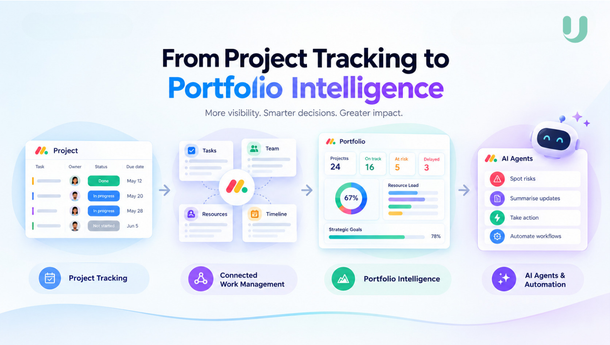
A modern AI work management platform is a single-space solution to streamline and simplify business operations by providing collaboration, automation, reporting, and AI.
Manual processes and efforts to reach coworkers to provide the information necessary to perform the next task in the workflow can be fully automated, and the functionality of the AI allows the team to make rapid, more informed decisions.
How monday.com Work Management Makes Your Life Easier
The flexibility of monday.com work management is one of the biggest advantages of using the software for the management of day-to-day operations in the business.
Whether you manage an onboarding or marketing campaign, software, or HR processes, the platform adapts to your business operations.
Unlike legacy systems based on traditional spreadsheets, monday.com allows you to:
- Track work as it's done.
- Collaborate in a Centralized workspace.
- Track deadlines and dependencies.
- Draw dashboards and timeline views of your project.
- Integrate all your different departments and functions without having to swap tools.
This makes prioritising tasks easier for teams and increases overall transparency.
Recognise Which Tasks are Redundant
Reviewing existing processes is an important step before automating anything.
Consider the following questions:
- Which tasks are redundant daily or weekly, or in general?
- How frequently do team members have to manually input data?
- Which approvals seem to take the longest?
- Do reminders need to be sent?
- How many emails need to be sent to update team members on a project?
All of the above questions describe the types of tasks that are best for automating.
Using Automations on monday.com to Eliminate Redundant Tasks
monday.com Automations essentially streamline process consistency and eliminate redundant manual administrative tasks.
Some automations that are used frequently include the following:
- Automatically assigning tasks for the start of a newly initiated project.
- Notifying team members when they have an upcoming deadline.
- Updating the status of a project after an approval is received.
- Moving tasks to the next workflow stage.
- Creating tasks that are to be completed on repeat.
- Automatically prompting a status change.
Using monday.com Automations helps teams focus on the goals of the organisation.
Avoid Errors When Automating Workflows
Automating tasks does have some drawbacks. The following are the most common errors made by companies that automate tasks.
-
Automating everything at once
To avoid this, focus on a few of the most important or impactful processes. This will help you avoid an unnecessarily complicated system. - Neglecting automation training
Not training employees how to use automation systems will result in zero benefit from implementing the automation. - Too Many Notifications
Too many alerts lead to notification overload and important alerts being missed. - Not checking workflows
Workflows are bound to change over time. Regular checkups help ensure your automations meet your needs.
monday.com AI Agents and Workflow Automation
Automation relies on set rules; monday.com AI agents infuse intelligence into automations.
Rather than moving tasks along a workflow, AI agents can:
- Provide a summary of the activity.
- Create a task description.
- Write meeting minutes.
- Suggest next steps.
- Evaluate the activity.
- Sort the vast amount of information received.
This allows teams to make decisions more quickly and minimises the number of administrative tasks to be done.
Practical Uses of monday.com AI
AI-powered features help teams increase productivity, and the possibilities are virtually endless in most industries.
Some examples are:
- Marketing teams no longer need to draft meeting briefs to discuss marketing progress; they are done automatically.
- In sales, AI now suggests which opportunities to follow up on next.
- In HR, onboarding tasks and documentation are automated.
- In IT, support requests are categorised automatically to determine which need the most immediate attention.
AI and Automation are powerful tools to help design workflows that meet the demands of the rapidly changing business environment.
Sustainable Automations
Workflow automations should simplify tasks, not complicate them.
Some useful guidelines to help achieve this are:
- Rules associated with automation should be very clear and easily understandable.
- Workflows should be documented.
- Before automating a workflow for the whole organisation, thoroughly test the automation.
- Continually monitor the automation and refine the processes around it.
- Utilise the people who will be using the automated workflow to help design the automation.
- Automations should help achieve business goals rather than personal goals.
This structured approach helps ensure long-term success as your organisation grows.
Final Thoughts
Thoughtful implementation of workflow automation can drive meaningful improvements across an organisation. By leveraging monday.com work management, strategically configuring automations, and enhancing workflows with monday.com AI capabilities, businesses can eliminate repetitive tasks, improve collaboration, and create more efficient ways of working.
While many organisations view automation as a one-time setup, the most successful teams treat it as an ongoing process that evolves alongside changing business goals, customer expectations, and operational requirements. Regularly reviewing and refining workflows ensures that automation continues to deliver value as the business grows.
For businesses looking to maximise the potential of workflow automation, partnering with experienced monday.com specialists such as upstream can help ensure workflows are designed, implemented, and optimised to support long-term scalability and performance.