My Region
How monday.com Work Management Helps Operations Teams Work Smarter
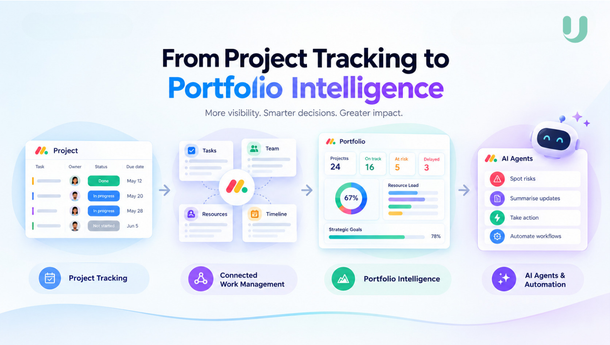
Operations teams have a hard time getting approval requests and statuses because they have to do it multiple times in multiple tools. monday.com helps with that. Because of the AI agents integrated into the platform, it will automatically close status gaps and requests and approvals.
What is detailed here is not an overview of monday.com's features. It shows how monday.com helps optimize operational processes by reducing coordination costs. If used correctly, it can help transform operational processes and help teams with automation.
Understanding Inefficient Operations
Most operations managers know they have inefficient processes. The frustrated employees and teams should be evidence enough. But the inefficiencies are often small things that get repeated, not one huge catastrophe.
These inefficiencies include:
- Project status that lives in one tool but must be copied over to a different tool for leadership, and is updated infrequently.
- Approvals that are stuck in an employee's inbox because they are answered in the order that emails are read.
- Transfers of work between departments are hindered by the fact that someone has to remember to send the message.
- The time it takes to compile a report is longer than the time it takes to actually perform the tasks that the report is describing.
This isn’t an issue with the people; it’s an issue with the systems. This is where monday.com work management comes in to simplify things. monday.com work management alleviates the need for an additional tool by providing teams with a system to visualise how work is done.
The problem keeps getting worse because it’s hard to measure. Some delays don’t look concerning when you evaluate them separately. Missing the approval deadline, delays in status updates, handoff delays, etc., look unimportant when you look at them as separate issues. But when you look at it as a whole company, these problems can stymie a company’s growth. Separately, these problems look small, but cumulatively they create an unnecessary burden that causes operations to hire more employees to meet a demand that shouldn’t exist.
What monday.com Work Management Actually Solves
monday.com is more than just a work management app; it’s a solution to the stress caused by having to chase down details in various applications. Most systems that support the management of operations are fairly inflexible. This is made worse by the lack of uniformity in operations.
Operational pain point
How monday.com addresses it
Outcome for ops teams
The pattern across the five rows is the same: monday.com goes beyond just work tracking. With monday.com, the need for manual work coordination between the steps is no longer needed. Naturally, that creates a significant difference between a simple task tracker and a work management system.
Consider a common ops scenario. A service request is submitted and needs approval from two departments. Once approved, the request is handed to a delivery team. Using a task list with spreadsheets and email, the service request would now be in three different places. With monday.com, the request is moved through one board. The approval step automatically notifies the delivery team, and approval is visible to all stakeholders with permission. There is no coordination left to be done.
monday.com AI Agents: The Next Frontier of Work Operations
The introduction of monday.com AI agents integrated into the platform is arguably the biggest advancement in work management since the introduction of a new board view. Instead of treating AI as a chatbot that is a bolt-on to the side of the platform, it integrates agents that function inside the workflow.
For operations teams, the introduction of AI agents is already impacting the way teams work in practical and effective, if unglamorous, ways. These use cases include the following:
- Digest agents that read project updates and summarise them in plain language so that the manager does not have to read through a week of comments for a stand-up meeting.
- Workflow agents that execute natural language commands that include the creation of multiple tasks on a board or the drafting of a response to a frequently asked request.
- Blocker and risk detection that flags tasks that are unassigned, overdue, or stuck in a workflow.
- Data agents that create board or dashboard views in response to plain language requests.
The speed at which the platform is expanding to incorporate new AI capabilities is important to anyone who is looking to adopt monday.com now. The teams that are currently using it as a task tracker are at a distinct disadvantage to those that are using it as an AI-assisted operating layer.
Being clear on where this does or doesn’t make an impact matters. AI agents do not replace the judgment call of an operations manager. They replace the manual work of researching the facts on which that judgment can be based. A manager is still responsible for deciding whether a lagging task is an escalation issue. The AI agent is tracking the lagging task to make sure that the escalation need is visible. The manager does not have to find it or be aware of it. That difference is important as we work on setting our expectations internally, as we, as an organisation, learn new things, especially with the teams who are most concerned about anything labelled “AI” since so much has been overhyped in the industry.
Build It Yourself, or Bring in monday.com Experts?
Because monday.com is flexible, people assume implementation is something they can do themselves. For one or two boards, that may be true. The real complexity comes when there are multiple boards across teams. Integration is an issue when there are processes that need to comply with specific business requirements (approval, compliance, etc.).
Self-implementation versus Working With monday.com Experts
This is the gap that monday.com implementation consultants fill. They will not provide a standard template; they will learn the inner workings of the operations team and create the boards, automations, and dashboards that align with that.
What a monday.com Implementation Consultant Does
- Conducts multiple discovery sessions to learn about current process flows and where executives want reporting, all before building a solution.
- Constructs a board and workflow structure that mirrors the way the operations team works and passes along tasks, and not a standardised best-practice template.
- Creates necessary automations and integrations along the tools the team is using, whether that is a CRM, finance, or communications, so that there is no need for manual data entry.
- Adoption of the system does not rely on a single self-identified "power user"; the consultant does the training and builds documentation.
- The consultant also continues to support the system after the implementation, rather than "going away" after the system goes live.
Essential criteria for choosing a monday.com partner
Before settling on a monday.com partner, it helps to know that not all of them provide the same level of service. It’s helpful to look at their tier level (Silver, Gold, Platinum) to get a general idea about their experience and service level, but that’s only part of the picture. When it comes to selecting a partner, an operations team tends to look beyond the badge at three key areas:
- Does the partner have experience in our industry and with our processes? Have they built partners’ operations workflows, or just sales and marketing boards?
- How sophisticated is their automation and integration? Will they be able to connect monday.com to your existing systems, or will integration happen in a vacuum?
- Do they design for user adoption? A board that’s correct from a technical perspective but is used by no one is not a solution to the problem.
Real monday.com partners should showcase workflows they have built for an operations use case, such as Service Delivery, Supply Chain, Resource Management, and Approval Workflows, and not just generic project management examples.
Where monday.com falls short
Let’s be honest, no software can solve a poorly designed or undefined workflow. Consistency in operations is the result of agreeing on a standard way of doing things. If this standard simply does not exist or was merely a constraint of the previous tool employed, the inconsistency will simply be migrated to monday.com. It is great at providing structure and clear visibility in an operations process that has already been defined. It's not a substitute for that process definition.
Like most digital workplaces, most monday.com AI agents work best within a clear framework. An agent that summarises, updates, or flags blockers derives its usefulness from the quality of the updates or the blockers it is provided with. This leads us back to the quality of implementation. This is even more important than the breadth of features selected.
The Context of Australian Operations
Several locally grounded business realities rate the practical usage of monday.com by Australian operations teams. Most businesses in Australia have Hybrid and/or distributed teams, with staff based in multiple states or working from home, necessitating the greater use of asynchronous visibility as compared to status meetings that are scheduled to accommodate staff in a single office. Fair Work Australia’s requirements for the auditing of staff’s working hours and leave also necessitate that operations workflows include an audit trail. This can be supported by the activity logs and automation history within monday.com, provided boards are structured with this in mind from the outset.
The operations teams of many Australian businesses also work outside the Australian time zones with clients, suppliers or offshore staff, including operations staff located in upstream’s offices in India and Singapore. This is a perfect fit for the type of handoff that monday.com automations are built to facilitate. For example, a task moving to the next stage can be automated without a staff member being located in the relevant time zone to trigger that automation.
Frequently Asked Questions
Is monday.com only for project management, or does it work for operations?
It is definitely not limited to project management. Operations use cases, such as supply chain tracking, service delivery, approvals, and resource allocation, are some of the most common applications within monday.com. This is because operations tasks, just like project management tasks, benefit from the visibility and automation that it facilitates.
Do we need a monday.com implementation consultant, or can we do it ourselves?
Internal implementation is usually fine for simple, single-team boards. For multi-team workflows, integrations, and especially compliance/process workflows, a consultant will greatly minimise rework and increase the speed of adoption.
What do monday.com AI agents need to perform well?
Clean, consistent boards. Because agents utilise the existing data, the benefit agents provide is proportional to the quality of the workflows.
How long does operations implementation usually take?
It is highly variable based on the number of workflows and integrations, but typically, most single-department implementations take a few weeks from alignment to go live with continuous training and improvements.
What do we want from a monday.com partner?
We are looking for concrete implementation experience with operations (not just basic templates), true expertise with integrations and automation, and a focus on training in addition to implementation.
Can we use monday.com in place of our current systems, like our CRM or finance systems?
It typically works in conjunction with our existing systems and utilises integration to share data with no manual entry.
Is monday.com a great option for teams that have previously attempted a work management tool and their efforts have failed to become a permanent work practice?
Absolutely, and it's a frequent initial step. The main cause of low adoption following an initial rollout is most often a lack of design of the workflows and processes, as opposed to a particular tool. This is what the proper implementation phase aims to address before automating processes and integrating AI agents.
What to do Next
monday.com work management helps operations teams visualise tasks and the flows of work within the system, and with the embedded AI agents, the system is managing small tasks and coordination that consume most of a work manager's time. The work management system is only one part of the equation. Teams that implement the system the most effectively view the implementation as the design of their workflows, not the installation of software.
As a monday.com Platinum partner operating in Australia, India, and Singapore, upstream assists operations teams in designing their workflows and implementing monday.com in a way that the system is robust and sustainable as the business grows, with all the necessary support of automation and integration.